
A Head Mounted Display (HMD) is a wearable device that places a small screen in front of your eyes. It lets you see digital images as if they are part of the real world or a fully virtual world. Many people use HMDs for gaming, training, medical work, and industrial design.
As someone working closely with display systems and optical modules, I can say that HMD technology is not just about screens. It combines micro displays, optics, sensors, processors, and software to create an immersive visual experience.
In this article, I will explain everything in simple language so that even a beginner can understand how it works.
What Is a Head Mounted Display?
A Head Mounted Display is a wearable display device fixed on the head using straps or a frame. It positions a screen very close to your eyes. Instead of looking at a TV or monitor, the display moves with your head.
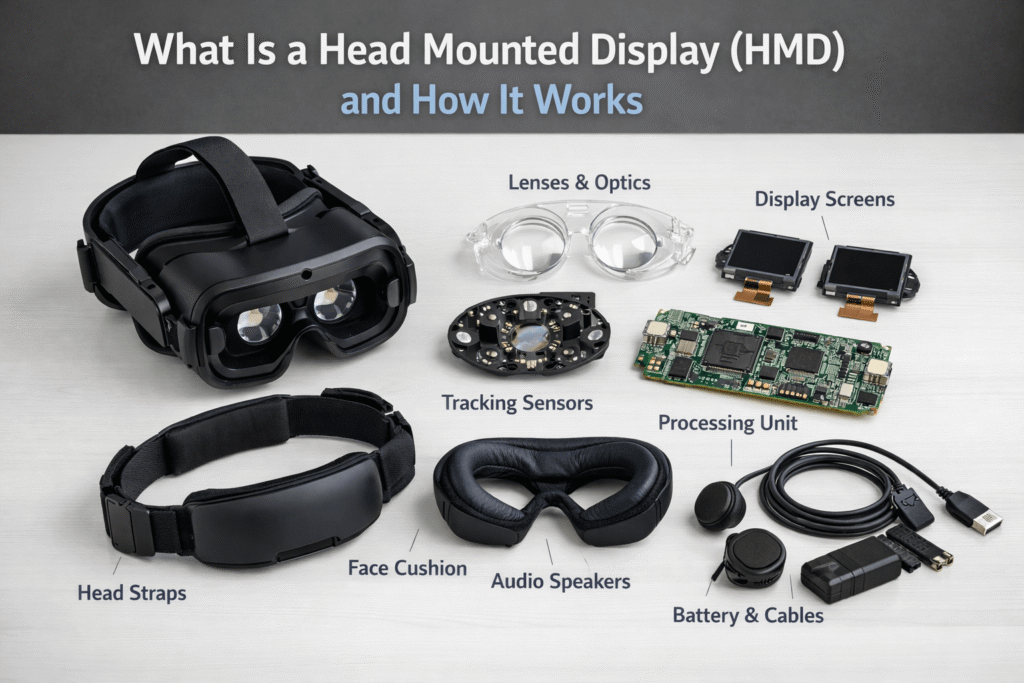
Main Components of an HMD
Every HMD has four core parts:
-
Display Panel – This can be Micro OLED, Micro LED, LCD, or LCOS.
-
Optical Module – Lenses or waveguides that direct the image into your eyes.
-
Sensors – Gyroscope, accelerometer, and sometimes cameras to track movement.
-
Processing Unit – A chip that renders graphics in real time.
In simple words, the processor creates the image, the display shows it, the optics guide it to your eyes, and the sensors track your movement.
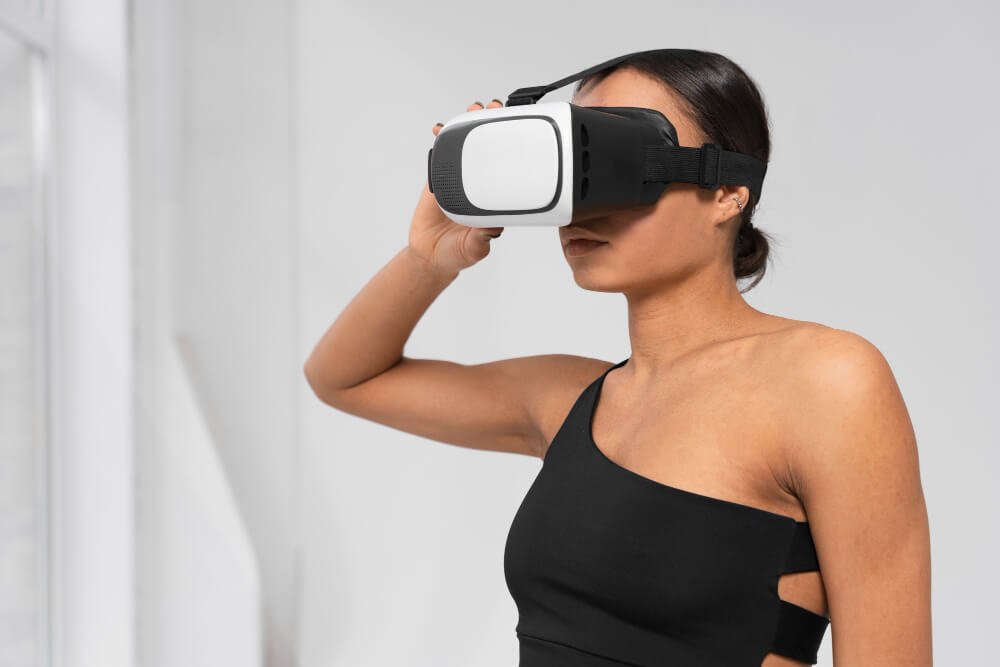
How Does a Head Mounted Display Work?
Let’s break it down step by step.
1. Image Generation
The graphics processor creates digital images. These images may come from a computer, gaming engine, or embedded chip.
2. Display Projection
The micro display panel produces light. In advanced systems, micro OLED displays are used because they offer:
-
High pixel density (PPI)
-
Deep contrast ratio
-
Fast response time
-
Low power consumption
These features are important for clear visuals and smooth motion.
3. Optical Alignment
Lenses or optical combiners enlarge the tiny image so your eyes can focus on it. Without optics, the image would look very small and blurry.
4. Motion Synchronization
Sensors track head movement. When you turn your head, the system updates the image instantly. This reduces motion-to-photon latency, which is the delay between movement and image update.
If latency is too high, users may feel motion sickness. Good engineering keeps this delay very low.
Types of Head Mounted Displays
HMDs are divided into different categories based on how they show content.
Virtual Reality (VR) HMD
VR headsets block the real world and create a fully digital environment. They are used in gaming, simulation training, and education.
Example devices include products from Meta and Sony that focus on immersive VR experiences.
Augmented Reality (AR) HMD
AR devices place digital images on top of the real world. You can still see your surroundings.
For example, Microsoft developed AR-based headsets for enterprise and industrial use.
Mixed Reality (MR)
Mixed Reality combines VR and AR. Digital objects can interact with real-world objects. This requires advanced tracking and spatial mapping.
Tethered vs Standalone
-
Tethered HMD – Connected to a PC or console
-
Standalone HMD – Built-in processor and battery
-
Smartphone-Based – Uses a mobile phone as display and processor
Each type has different power consumption, resolution, and performance levels.
Display Technologies Used in HMDs
The display panel is the heart of an HMD.
Micro OLED Display
Micro OLED is widely used in modern AR and VR devices because it offers:
-
Extremely high pixel density
-
Excellent contrast ratio
-
Thin and lightweight structure
-
Energy efficiency
For near-eye display systems, pixel density above 3000 PPI is often required for sharp visuals.
Micro LED Display
Micro LED provides high brightness and longer lifespan. It is good for outdoor AR glasses.
LCOS (Liquid Crystal on Silicon)
LCOS is often used in projection-based systems. It provides high resolution but needs strong backlighting.
AMOLED and LCD
AMOLED provides good contrast but lower PPI compared to micro OLED. LCD panels are cheaper but consume more power and have lower contrast.
From an engineering point of view, choosing the right display depends on application, brightness requirement, thermal management, and cost structure.
Applications of Head Mounted Displays
HMDs are not only for gaming. Many industries use them.
Gaming and Entertainment
VR gaming is one of the biggest markets. High refresh rate (90Hz or 120Hz) is important for smooth gameplay.
Industrial Training
Companies use VR simulation to train workers in safe environments. This reduces risk and cost.
Medical Field
Surgeons use AR displays to see 3D medical images during procedures. This improves accuracy.
Military and Defense
Early HMD systems were developed for fighter pilots. Even today, defense systems rely on advanced helmet-mounted displays.
Enterprise and Remote Collaboration
AR smart glasses allow technicians to receive real-time instructions while working. This improves productivity.
Advantages of Head Mounted Displays
From my experience in display integration projects, HMDs offer strong benefits:
-
Immersive viewing experience
-
Portable and wearable design
-
High pixel density near-eye viewing
-
Real-time motion tracking
-
Space-saving alternative to large monitors
For B2B suppliers, HMD technology creates new opportunities in optics, micro displays, and embedded systems.
Limitations of Head Mounted Displays
Despite their benefits, HMDs still face challenges:
-
Battery life limitations
-
Heat generation
-
Comfort and weight balance
-
Eye strain during long use
-
High manufacturing cost
Engineers must carefully design thermal systems and optimize power efficiency.
Can Head Mounted Displays Replace Traditional Screens?
HMDs can replace monitors in some situations, like virtual offices or 3D design work. However, for long daily use, comfort and ergonomics are still concerns.
In the future, lighter AR glasses with advanced micro OLED panels may become common for work and communication.
How to Choose the Right Head Mounted Display
When selecting an HMD for business use, consider:
1. Application Type
Is it for gaming, industrial training, medical use, or defense?
2. Display Technology
Micro OLED for high resolution
Micro LED for high brightness
LCOS for projection systems
3. Performance Specifications
-
Field of View (FOV)
-
Pixel Density (PPI)
-
Refresh Rate
-
Latency
-
Power Consumption
4. Comfort and Weight
Lightweight design improves long-term usability.
Conclusion
A Head Mounted Display is more than just a wearable screen. It is a complex system that combines micro display technology, optics, sensors, and real-time processing to create immersive digital experiences.
As display technology continues to improve, especially with micro OLED advancements, HMD devices are becoming lighter, sharper, and more energy efficient. For suppliers, engineers, and B2B partners, understanding the technical structure and performance factors of HMDs is essential for staying competitive in the AR/VR industry.
With the right display architecture and optical design, head mounted displays will continue shaping the future of visual computing.
Frequently Asked Questions
What is the difference between VR and AR HMD?
VR blocks the real world. AR overlays digital content on the real world.
Which display is best for head mounted display?
Micro OLED is widely preferred for high-resolution near-eye applications.
Do HMDs cause eye strain?
Improper focus distance or high latency may cause discomfort. Modern systems reduce this risk.